Using tagged images with Tilt, Kustomize and Kubernetes
I wrote this post back in February but never got around to publishing it, so here it is now.
Preface
I’ve been using tilt extensively recently to provide a local testing environment for workplace projects.
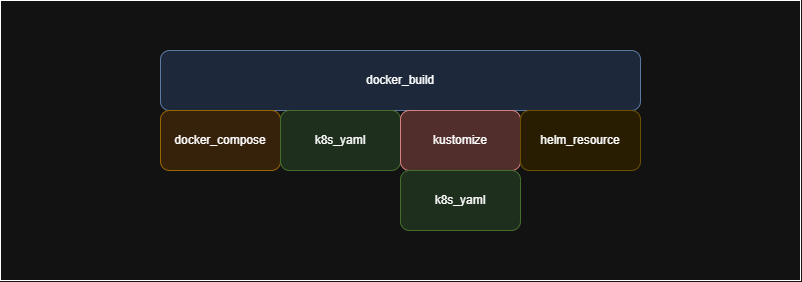
I particularly appreciate how it can provide the build > deploy loop for many different docker projects; docker-compose, k8s yaml, kustomize and helm.
We already use the git extension for Tilt to check out tagged/branches of a repository when building dependencies for our local development environment, this allows us to:
- Work seamlessly on code changes within the local project
- Work quickly on code changes outside of the project in a dependent project via branches, great for features that span multiple repositories
- Also allows us to work against versions outside of the project via tags, for cases where we want a stable or particular version of a dependency and don’t expect any changes
So what is this blog post about if we already use tagged repositories or branches of a repository already?
Our staff engineer was adamant that we should be using tagged images pulled from ECR (Elastic Cloud Registry) in our local development environment too as these are the end build artifacts of our pipelines.
Okay then, challenge accepted…
Existing flow
- Do a docker build of the local resources with source code provided either via local code or via a git extension checkout of a branch/tag (via
docker_build()) - Apply kustomize to generate our k8s manifests (via
kustomize() - Deploy this to our local kubernetes context (via
k8s_yaml())docker_build("blah.dkr.ecr.eu-west-1.amazonaws.com/my-svc", ".", ignore=['docs', 'config']) k8s_yaml(kustomize('.infra/k8s/overlays/local'))
How to achieve this?
- Break down our kustomize and k8s block into two-step process;
- Assign our
kustomizeOuput = kustomize('.infra/k8s/overlays/local')output to a variable - and then apply this to Kubernetes
k8s_yaml(kustomizeOuput)
- Assign our
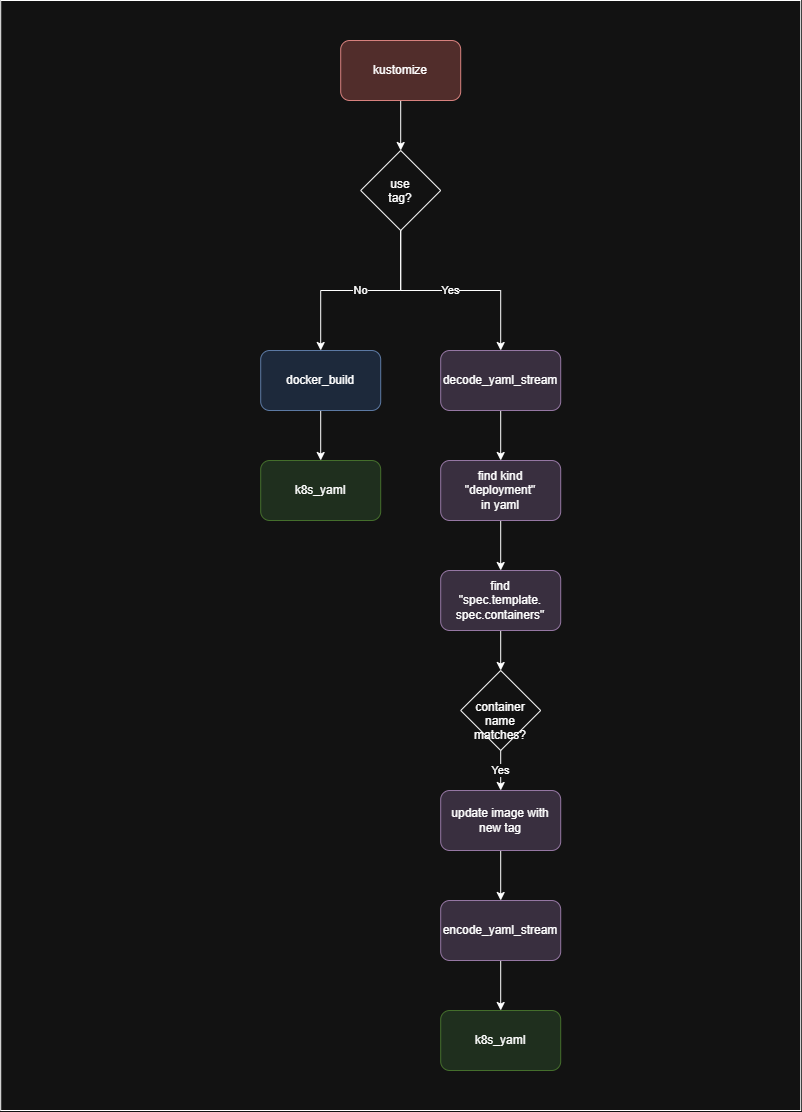
- If we’re not using a tag then this is the same as before, except we have the two-step process mentioned to apply the manifests
- If we are using a tag then we need to modify the
kustomizeOutputbefore applying it to Kubernetes
The solution
tag = os.environ.get('MY_SVC_TAG')
kustomize = kustomize('.infra/k8s/overlays/local')

if tag == None:
  docker_build("blah.dkr.ecr.eu-west-1.amazonaws.com/my-svc", ".", ignore=['docs', 'config', 'model', 'respondent', 'surveys', 'utils', 'main.go', 'router.go'])
  k8s_yaml(kustomize)
else:
    # If we have a tag, we need to modify the kustomize yaml to use the right image tag
    print("Using image tag: " + str(tag))
    objects = decode_yaml_stream(str(kustomize))
    for o in objects:
        if 'kind' in o and o['kind'] == 'Deployment':
            for i in o['spec']['template']['spec']['containers']:
                if i['name'] == 'purespectrum-panel-svc':
                    i['image'] = "blah.dkr.ecr.eu-west-1.amazonaws.com/my-svc:" + tag

    k8s_yaml(encode_yaml_stream(objects))
- Using the Tilt doc on How to Make Small Patches in a Tiltfile we apply the following:
decode_yaml_stream(str(kustomize))- Utilising the
str()method we convert the kustomize blob output to a string - We convert this kustomize yaml string output with
decode_yaml_streamto a list of Skylark objects
- Utilising the
for o in objects:- Loop through the list of objects checking each
kindfor theDeploymenttype - Then we check the
spec.template.spec.containerslist for the container we want to modify - We update the
imagefield to use our tagged image
- Loop through the list of objects checking each
- Finally we then use
encode_yaml_streamto convert our modified list of objects back to a yaml string
- Now we’re back at the same place we’d be with our original kustomize output so we can apply this to Kubernetes with
k8s_yaml()
So how do we use?
- Set an environmental variable for the tag you want to use and bring up tilt
MY_SVC_TAG=v1.2.3 tilt up
- If the tag isn’t present then we continue to build and apply the docker image to our kubernetes context from source code